Verified Bitcoin (vBTC)
Esta página aún no está disponible en tu idioma.
Overview
Section titled “Overview”vBTC is Bitcoin on the VerifiedX network, one to one:
- Each vBTC is backed by Bitcoin held in a vault whose key is split among VerifiedX validators.
- vBTC moves between VFX addresses in seconds for a small VFX fee.
- Any holder can withdraw its vBTC to a Bitcoin address.
These steps describe the 9.0 releases of the VerifiedX wallet and web wallet. Use them with a Core 9.0 network: earlier wallet releases still offer steps a 9.0 vault no longer needs.
Getting Started
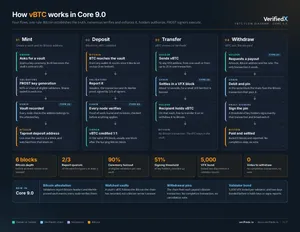
Section titled “Getting Started”- Create a vBTC token (vault). In the vBTC section, choose to create a token, give it a name, and confirm. The wallet starts a key ceremony among the validators (
MPC Ceremony in Progress, rounds 1 to 3); it runs in the background and can be dismissed. When it completes, the contract is created and the token appears in your list. A new wallet can also use the wizard, which creates the token and funds it in one go. - Fund it. Open the token and choose
Fundto send BTC from one of your BTC accounts, or copy theBTC Deposit Addressand send from any wallet. The vBTC appears once the Bitcoin transaction is buried under 6 Bitcoin blocks (3 on testnet) and the validators have reported it.My BalanceandToken Total Balancethen show it. - Transfer vBTC.
Transfersends part of your vBTC to another VFX address. The owner can also transfer the token’s ownership; the new owner takes over the vBTC no holder holds. - Withdraw to Bitcoin.
Withdraw, enter the BTC address, the amount and a fee rate, and confirm. The Bitcoin fee is taken out of the amount, so the address receives the amount less the fee. That’s all you send.
Following a withdrawal
Section titled “Following a withdrawal”After the request is in a block, the withdrawal dialog shows where it stands:
Withdrawal in Progress, no Bitcoin transaction yet. The chain is waiting for the vault’s coins to pay it (for example while another withdrawal holds them). It is fixed as soon as they allow. Until then you canCancel Withdrawal: when the cancel is in a block the withdrawal is closed and your vBTC is back. No vote is held.Withdrawal in Progresswith a Bitcoin transaction. The chain has fixed the Bitcoin transaction that pays it, and the vault’s signers broadcast it on their own, usually within a few minutes.Open in BTC Explorershows it. If it is not confirming, enter a higher fee rate and chooseRaise Fee(the higher fee comes out of the withdrawal), orReleaseto give it up: its Bitcoin goes back to the vault and your vBTC is refunded, less the release’s Bitcoin fee. If the original transaction confirms first, the withdrawal is paid by it.Withdrawal Complete. Bitcoin has confirmed the payment. The dialog names the Bitcoin transaction that paid it.
You can close the dialog at any time and reopen the withdrawal from the token’s history. The VFX transaction list labels these steps vBTC Withdrawal Request, vBTC Withdrawal Fee Raise and vBTC Withdrawal Release, and shows the network’s Bitcoin Report transactions.
Older vaults
Section titled “Older vaults”A vBTC token created before the network’s Bitcoin attestation height is an older vault. It is frozen at the network’s enforcement height: from then on its vBTC can’t be transferred or withdrawn, and Bitcoin sent to it is not credited. Before that height, move your vBTC to a new token or withdraw it. The token’s details say when a vault is an older one.
Reserve accounts
Section titled “Reserve accounts”vBTC can be held in a reserve (vault) account for its time-lock and recovery protection. A transfer from a reserve account is held for 24 hours and can be called back until then. vBTC can’t be withdrawn to Bitcoin directly from a reserve account: move it to a normal VFX address first.
vBTC Flow Diagram
Section titled “vBTC Flow Diagram”